SEO and Marketing Teams
No more silos! Your integrated marketing operation, all in a single tool.


Maintain your brand voice across all channels, from your website to email marketing.
Go from competitor, content, and technical SEO analysis to results up to 70% faster.
Up to 5x more data than Search Console, with exclusive reports and conversational data chats.
Increase your efficiency and results without raising your operational costs!
1. Brand Guide
- Set up your brand persona, tone of voice, and editorial rules just once.
- Niara understands your brand and customizes all content generation.
- Consistency across all channels, from emails to articles.
2. Authority Map
- Want to boost your brand's authority and visibility? Niara shows you the path, using real data from your website.
- Discover which topics your site already dominates and where you need to improve.
- Generate a content calendar for up to 3 months with a single click.
3. Production & Scale
- Once your plan is ready in the Authority Map, execution is immediate.
- Go from competitor analysis to content optimized for Google and LLMs.
- Generate hundreds of texts for landing pages, product descriptions, and meta tags.
4. Technical Agent
- You don't need to be a developer to have a technically-perfect site. We integrate with PageSpeed Insights and Search Console to audit your site in real-time.
- Reports on Indexing, Errors, and Core Web Vitals.
- Our agent doesn't just say "improve LCP." It tells you how to do it in your CMS.
5. Monitoring
- Say goodbye to spreadsheets and get up to 5x more data insights from your Google performance.
- Discover Quick Wins, run conversational queries, and detect cannibalization.
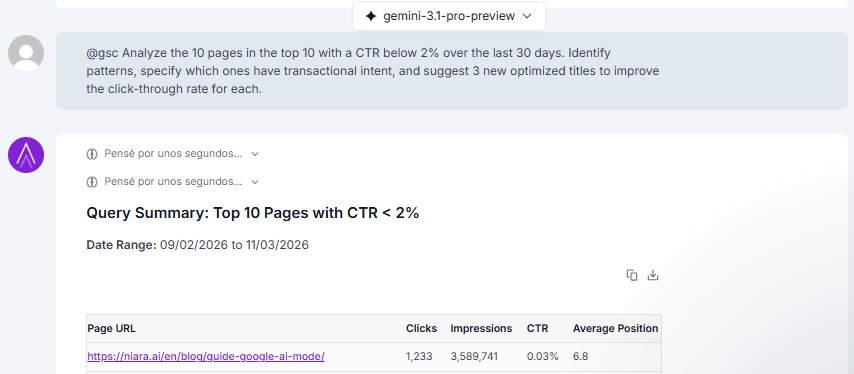
- Talk to your data. Just ask: "List the 10 pages with the lowest CTR and suggest 3 new titles optimized to increase clicks."
“Niara allowed us to move from operational tasks to focusing on the user experience, ensuring hyperlocal content for each of our 18 brands.”
Monique Barbosa
National Web Marketing Manager
Ânima Educação
Perfect features for your team
Simplify processes and eliminate the need to subscribe to 5 different tools.
Your Teams, Integrated
Share resources and speed up execution:
- Unified workflows.
- Maintain your brand’s standards.
- Greater efficiency and quality results.
Project-based Organization
Isolated environments for each project.
- Create projects for each domain.
- Customize with your brand’s guide.
- Total organization and data security.
Integrations
Google Search Console and Page Speed Insights.
- Exclusive reports and the innovative Conversational Analytics.
- Authority Map and Content Calendar.
- Technical SEO Agent.
Why choose Niara for your team?
Quickly scale your digital marketing operations without needing a large team, thanks to the automations and features offered by Niara.
The next success story can be yours!
“Partnering with Niara allowed us to move away from repetitive operational work. My team stopped spending hours on the basics and started investing time in strategy and curation. This enabled us to hit 110% of our organic traffic goal for the 2025 national college entrance exam campaign.”
“Niara participates in our brainstorming sessions, proposing topics, titles, and directions. When we define keywords and calendars for our clients, it facilitates a deep analysis of SERP competitors, contributing to a complete and creative outline.”
“Per month, the team creates over 100 content briefs and used to spend around 100 hours on this task alone. Today, with Niara, the team spends 30 hours per month. That’s a reduction from almost a full month to less than a week of work. Niara pulls all the competitor data and gives us a clear overview. It’s sensational!”
“I reduced my monthly operational routine by 36 hours. I was able to focus on strategy, generating a 3x increase in keywords in Google’s Top 10 and doubling my market share. It seemed like magic, but it was Niara.”
Flexible plans.
Perfect for your business
Plans for boutique agencies to large-scale operations.
Compare our monthly plans
Customizable plans. Need more content or keywords?
€ 49/month
€ 490/annual
Ideal for freelancers and consultants who need agility in production and analysis.
€ 99/month
€ 990/annual
The power of automations for teams that need consistency and strategy.
Custom
Custom solutions, implementation consulting, and enterprise-grade data security.
Frequently Asked Questions
What is Niara and how does it help my Shopify store?
Niara is an Artificial Intelligence tool that automates bulk content creation with a focus on SEO optimization. For your Shopify store, Niara allows you to generate hundreds of unique, compelling, and Google-optimized product descriptions in minutes, freeing up your time and boosting your sales.
How does Niara integrate with my Shopify store to create product descriptions?
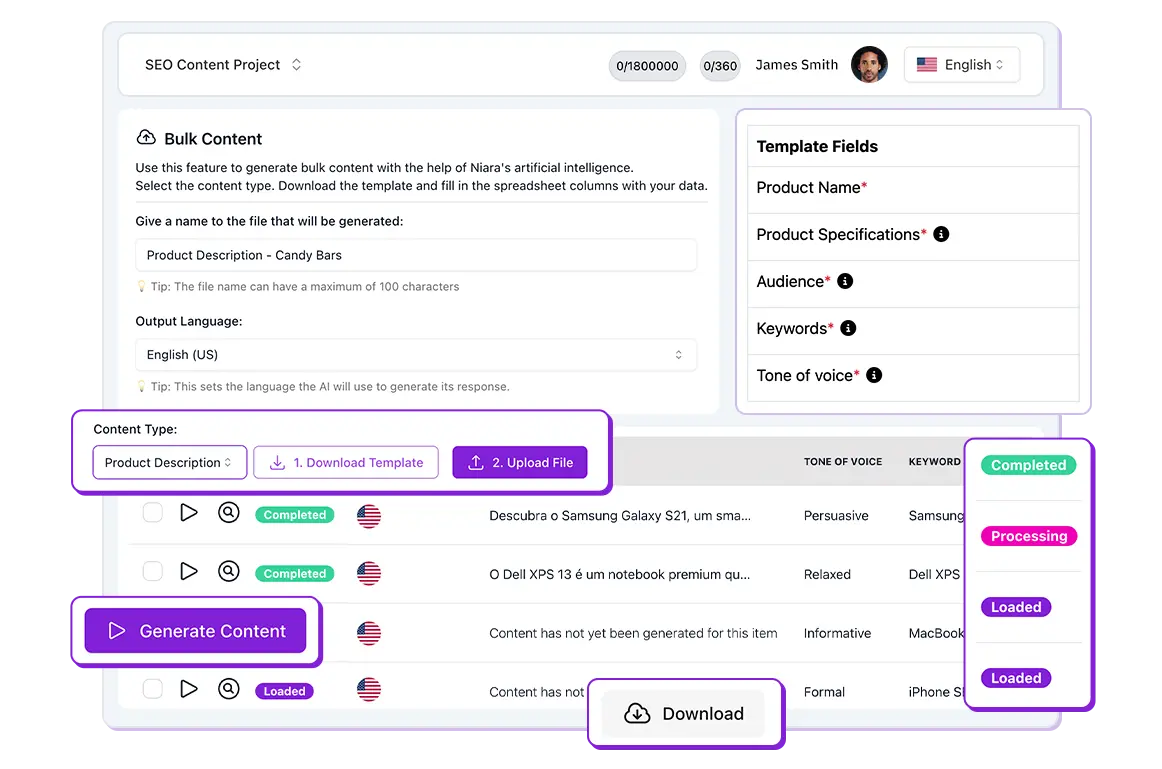
Niara works seamlessly with Shopify through spreadsheet imports and exports (CSV, XLSX, or XLS). You download Niara’s template, input the manufacturer’s specifications or the product descriptions you already use in Shopify, along with your brand’s tone of voice and target audience. Then, you upload the spreadsheet to Niara for our AI to generate the content in bulk. Afterward, you download the updated spreadsheet with the new descriptions and import it into your Shopify product catalog. No API integration is needed, but if you require one, feel free to contact us.
Is Niara better than Shopify Magic for generating descriptions?
What’s the difference? While Shopify Magic is excellent for individual description suggestions and edits, Niara excels at bulk generation and explicit SEO optimization. With Niara, you can generate 100 optimized descriptions in just 15 minutes, focused on ranking on Google and saving precious time that Shopify Magic doesn’t offer at scale. Additionally, Niara focuses on delivering high-quality, accurate content, minimizing the inaccuracies common in generic AIs.
Are the descriptions generated by Niara optimized for SEO (Google)?
Yes, absolutely! This is one of Niara’s biggest differentiators. Our AI algorithms are configured to create descriptions that not only attract customers but are also highly relevant to search engines, using strategic keywords and a text structure that favors Google rankings.
Can I customize the tone of voice and information in the product descriptions?
Yes, absolutely! Niara offers two powerful ways to customize your content. The first is directly in the spreadsheet, where you can provide context for each product (keywords, features, benefits). Additionally, to ensure maximum consistency, you can set up your brand guide directly on the platform.
Simply go to “Project Settings” and input your guidelines, such as target audience, tone of voice, mission, and values. This ensures that all AI-generated content is perfectly aligned with how your brand communicates.
Are technical skills required to use Bulk Content for Shopify?
No! Niara is designed to be user-friendly. You don’t need advanced technical skills. Simply follow the simple steps of downloading the spreadsheet, filling in the data, and validating it on the platform, and the content will be generated automatically. Our interface is intuitive and guided, with no coding or development knowledge required.
What types of content can I generate in bulk?
You can generate titles, meta descriptions, and detailed product descriptions in bulk. Choose the template that best suits your needs.
My Shopify store has many products. Is there a limit to the number of descriptions I can generate?
Niara.ai is built for scalability and bulk generation. Although there are subscription plan limits, our platform is designed to handle large volumes of products, allowing e-commerce businesses of all sizes to create descriptions for their entire catalog. Check our plans for specific volume details or, if you prefer, schedule a call with our team.
What happens if I’m not satisfied with the generated descriptions?
Niara allows you to review and edit the generated descriptions before downloading the spreadsheet. If needed, you can regenerate new versions of a single description or in bulk until you find the one that best meets your needs. You don’t have to go through the entire download/upload process again; there is a button on the platform to regenerate the item.
Can I edit the descriptions after they are generated by Niara?
Yes! The generated descriptions serve as a solid, optimized foundation. You have complete freedom to review them and make any fine-tuning or additional customizations before importing them back into your Shopify store.
Does Niara support languages other than Portuguese for Shopify?
Yes, Niara supports content generation in several languages, including European Portuguese, English, Spanish, and French, which is ideal for Shopify stores with an international reach. Need a language not yet supported by the tool? Contact us.
Is it safe to import and export my product data from Shopify to Niara?
Yes, the security of your data is our priority. Niara follows strict security protocols to ensure the protection and privacy of your information. To learn more, please visit our Privacy Policy.
Can I try Bulk Content for Shopify for free?
Yes, you get 5,000 words to generate bulk product descriptions. Create your free account and get immediate access to the tool to start generating product descriptions quickly and efficiently.
How Niara’s Credit Consumption Works
Think of your plan’s limits as the fuel for your operation. To make planning easier, Niara divides consumption into two main categories: Content Credits and Generated Words.
Unlike other tools that charge for everything you do, with Niara, you don’t spend anything to submit information to the platform.
What does NOT use your limits:
- Input: The commands (prompts) you type, the files you attach, or the URLs you ask Niara to read in ChatSEO do not consume words. You can provide as much context as possible to the AI without worrying about your balance. The reading is on us!
What DOES use your limits:
- Output: Consumption only occurs on what Niara writes or generates for you. Every word generated in a ChatSEO response, during the execution of a Task, or in the creation of Bulk Content is counted. Longer texts consume more words than short answers.
What’s the difference between Content Credits and Words?
To simplify the management of your SEO routine, we’ve separated consumption into two types:
- Content Credits: These are exclusively for the Content Workflow feature. Each time Niara analyzes the SERP, creates a brief, and generates an article in our Content Editor (complete with a Content Score), you use 1 Content Credit.
- Words: This is the balance used by Niara’s other tools. Every time the AI generates a response in ChatSEO, runs a Task, or creates text in Bulk Content, the generated words are deducted from this balance.
Tip: If you’re on the Team or Enterprise plans, you don’t need to worry about words in ChatSEO and Tasks, as their use is unlimited!
Understanding Credit Usage by Feature
To ensure you use your resources strategically, here’s how each Niara feature impacts your plan:
1. Content Workflow (SEO Brief + Content Editor)
The Content Workflow has its own balance, called Content Credits. Each time you analyze the SERP, generate a brief, and create an article (in the Content Editor with a Content Score), you use 1 Content Credit.
- Solo Plan: 8 content pieces/month
- Team Plan: 60 content pieces/month
- Enterprise Plan: Starting from 100 content pieces/month
2. ChatSEO, Tasks, and Bulk Content
These features consume your Word balance. The distribution works as follows, depending on your plan:
- Solo Plan: You have a unified balance of 60,000 words per month to use as you wish across ChatSEO (our conversational chat with over 50 prompts), Tasks (agents trained for specific routines, like keyword clustering), and Bulk Content.
- Team Plan: The use of ChatSEO and Tasks is Unlimited! For Bulk Content (ideal for generating hundreds of product descriptions or meta tags at once), you have a dedicated limit of 150,000 words per month.
- Enterprise Plan: Unlimited use for ChatSEO and Tasks, with a robust limit starting at 1,000,000 words per month for Bulk Content.
Important: With an annual plan, you receive all your credits for the year upfront. For example, on the Solo Annual plan, you immediately get 96 Content Credits and 720,000 words. This allows you to use more during peak months (like Black Friday) without worrying about monthly limits.
Unlimited Usage and the Fair Use Policy
For our Team and Enterprise plans, we offer unlimited use of ChatSEO and Tasks to give your team complete creative and operational freedom. However, to ensure the security of your data (remember: we operate with Zero Data Retention) and the platform’s stability for all users, we apply our Fair Use Policy.
- One Login = One User: Sharing passwords with third parties or illicitly configuring multiple simultaneous logins under a single credential is strictly prohibited.
- Human Use: The feature is intended to enhance the work of SEO professionals, preventing automated, robotic, or abusive behavior.
Failure to comply with these rules may lead to account suspension or termination. Human curation is irreplaceable, and Niara is designed to be your direct assistant.
Credit renewal
How your credits are renewed depends on the type of subscription you have:
- Monthly Subscription: Renewal follows your billing cycle. If you subscribed on the 15th, your limits will be reset on the 15th of every month.
- Annual Subscription (The Big Advantage): When you sign up for an annual plan, you get all the credits for the entire year at once! Your renewal will occur 12 months after your subscription date.
Important: Credits do not roll over. Unused balances expire at the end of your cycle. Plan your demands accordingly to get the most out of the tool!
How to Track Your Consumption in Real-Time
With Niara, you never work in the dark. We believe managing your account should be as simple as our interface.
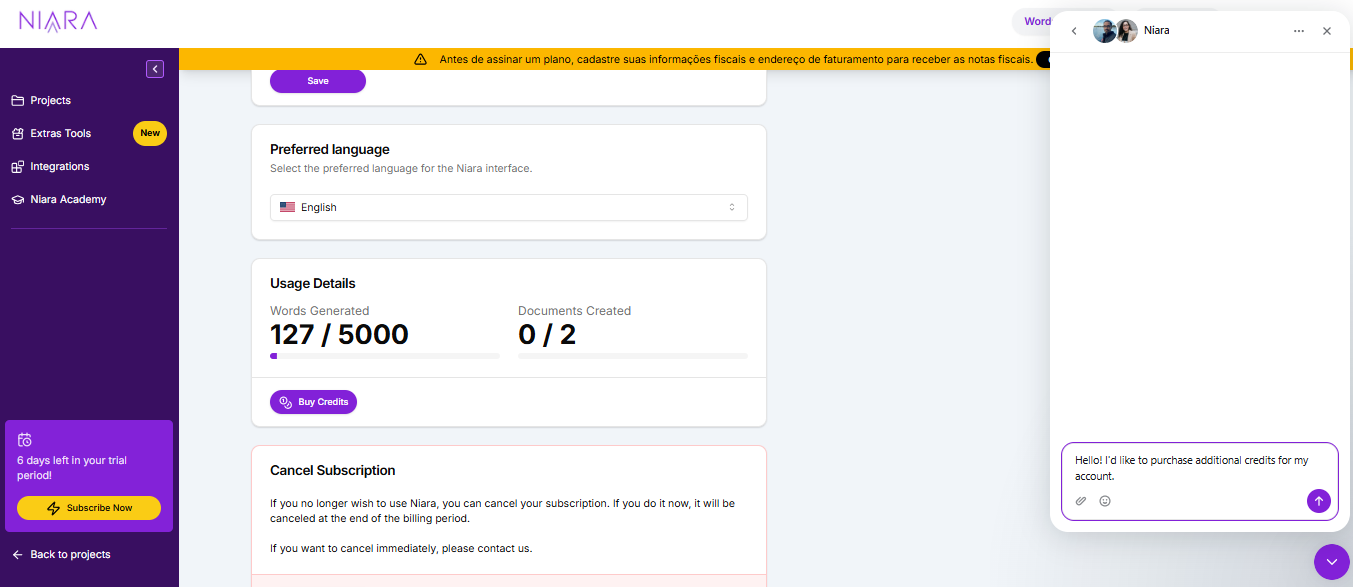
To check your available balance, just look at the top bar of the platform at any time, or go to My Account > Usage Details. There, we display visual progress bars and the exact numbers of what is still available in your current cycle.

What Happens When I Run Out of Credits?
At Niara, you’ll never get surprise charges on your bill. When your Content Credit or Word balance hits zero, the platform simply pauses the generation of new text and displays a notification on the screen.
Rest assured: you won’t lose access to your account or any content you’ve already created. To start producing again immediately, you have three options:
- Wait for the automatic renewal of your monthly cycle.
- Purchase a package of Additional Credits directly through our support chat.
- Upgrade to a higher plan (like the Team plan, which includes unlimited ChatSEO and Tasks).
How to Buy Additional Credits Without Changing Your Plan
We know the SEO and Marketing industry is seasonal. During major launch months, your demand might double, and you shouldn’t have to permanently change your plan for a temporary spike.
If your word or content balance runs out before your renewal date, you can purchase Additional Credits:
- Go to the My Account section.
- Select the Buy Credits option.
- You will be directed to our support team via the platform’s chat.

After contacting us and completing the purchase, the credits are instantly added to your current balance, allowing you to continue your work without interruption. It’s the flexibility you need to scale your operation on demand.
How Do I Upgrade My Plan to Get More Credits?
Has your operation grown and you need more firepower to scale? Upgrading is quick, and your new limits are applied instantly.
- Go to the My Account menu and navigate to the Subscription tab.
- Choose your new plan (e.g., upgrading from Solo to Team) and confirm.
- Fair Billing: The system calculates the cost on a pro-rata basis. This means you only pay the difference for the remaining days in your current billing cycle.
Does the Search Analytics Add-On Consume My Word Credits?
Search Analytics is an add-on (with a fixed monthly fee) that provides 5x more data than Google Search Console, allowing you to apply advanced search intent filters. Viewing this data in the dashboards does not consume your credits.
However, the key feature of Search Analytics is “Conversational Analytics”—the ability to talk to your data within ChatSEO (e.g., “List the top 10 keywords with the most clicks in the last 30 days”).
- If you are on the Solo Plan, the words generated by Niara in ChatSEO responses will be deducted from your monthly balance.
- If you are on the Team or Enterprise plans, ChatSEO usage is unlimited, so you can converse with your data as much as you want without using any words!
Does Deleting a Project or Content Refund My Credits?
No. Content Credits and Word balances are counted the moment Niara processes your request and generates the output.
Since the computational effort has already been expended to deliver the result, deleting the text, brief, or project afterward does not return the balance to your account. That’s why we always recommend using our Prompt Library in ChatSEO to ensure your command is as effective as possible on the first try!
What if There’s a System Error During Generation? Do I Lose My Credit?
We know that technology can sometimes be unstable. If you issue a command and the platform displays an error message or technical failure before delivering the full text, the system is smart enough not to count that usage.
If you notice that a credit was incorrectly deducted due to a platform issue, simply contact our support team via chat. We will investigate the case, and if a failure is confirmed, we will manually restore your credits.
Your investment is always safe with us!
What is Content Workflow?
Content Workflow is Niara’s solution to end the “blank page” syndrome and the need to open dozens of tabs to research competitors. It is an end-to-end tool that unifies competitor analysis, planning, and full article creation in a single place.
With a total focus on performance, Content Workflow acts first as a strategist. It analyzes what is already working on Google for your keyword or term and, based on this real data, builds an optimized article.
The goal is simple: to allow you to produce content with technical depth and ranking potential. All of this, up to 10x faster.
How Content Workflow works
The magic of Niara’s Content Workflow happens in three main steps. The first starts with you:
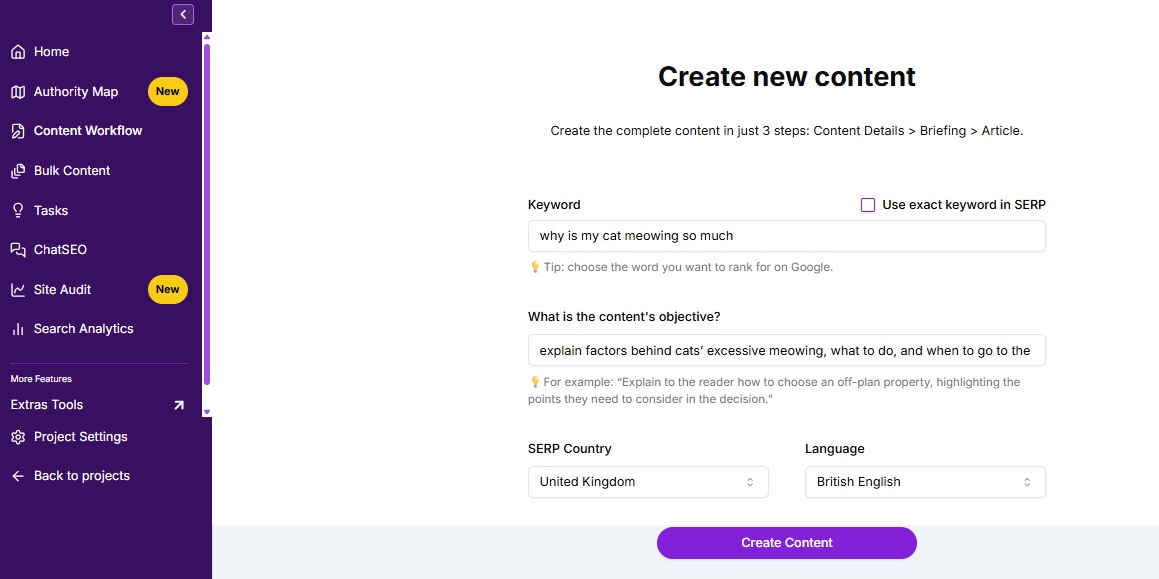
- Define the Keyword: In the initial field of Content Workflow, enter the main keyword or term you want to rank for (e.g., “digital marketing for lawyers”).
- Set the Context: Explain what the content should be like. The more information you provide, the more personalized the briefing generation and, consequently, the text will be.
- Also, select the country from which Niara should collect Google SERP information and the language.

Niara analyzes the results from Google’s first page (SERP) to understand what your organic competitors are writing about, which topics they cover, and what gaps exist, identifying patterns:
- What should the meta tags look like?
- Which topics (H2/H3) are essential?
- What questions do people also ask (People Also Ask)?
- Word count, images, and videos.
Niara does the heavy lifting of data gathering, and you step in with strategic curation.
Briefing Creation and Review
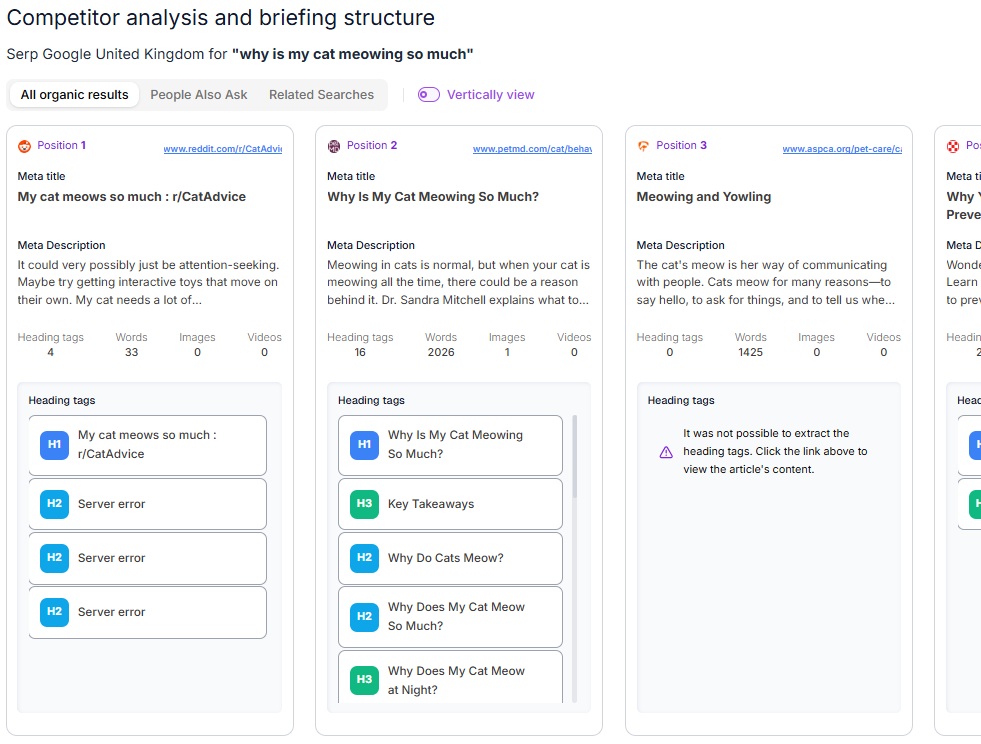
After analyzing competitors, Niara opens a new dashboard that centralizes everything you need: organic SERP competitors, People Also Ask questions, and related searches. Check out how to leverage each feature in this creation and review stage:
Analyzing the Competition
Right away, Niara lists the organic competitors from the first page and maps out the entire heading structure of each one.

Attention: On some sites, you might encounter the message “Could not extract heading tags. Click the link above to view the article content.” Don’t worry! This just means the site has a security block preventing our agent from reading it. Just click the link to check the structure directly on the page.
Structuring your Briefing
With the competition map in hand, you have two paths to build your briefing:
- Manual Selection: You can choose which competitor headings make sense, add them to your structure, and edit them.
- Automatic Generation: By clicking on “Generate briefing based on SERP”, Niara creates the briefing for you. The big differentiator here is that the AI not only organizes the topics but also identifies content gaps (opportunities your competitors missed), ensuring your text is unique and more complete. Plus, the tool already suggests the ideal Meta Description and Meta Title.
Strategic Content Details
Right below the structure, Niara organizes the elements that will give context and SEO power to your article. If you used automatic generation, the AI will have already filled these fields for you, but everything is 100% editable:
- Secondary keywords: Terms that complement your main keyword. They help expand the content’s reach and bring in more long-tail traffic.
- Semantic keywords: Terms related to the same universe as your main keyword. They are fundamental in helping Google understand the context and intent of your text.
- Audience: Who this text is being written for (e.g., beginners, managers, specialists). You can define it manually or let the AI suggest it.
- Specifications: The target text length (word count), suggested use of images and videos, and URL structure.

Review and Next Steps
Niara speeds up the process, but the final curation is always yours! Edit any field as your strategy requires.
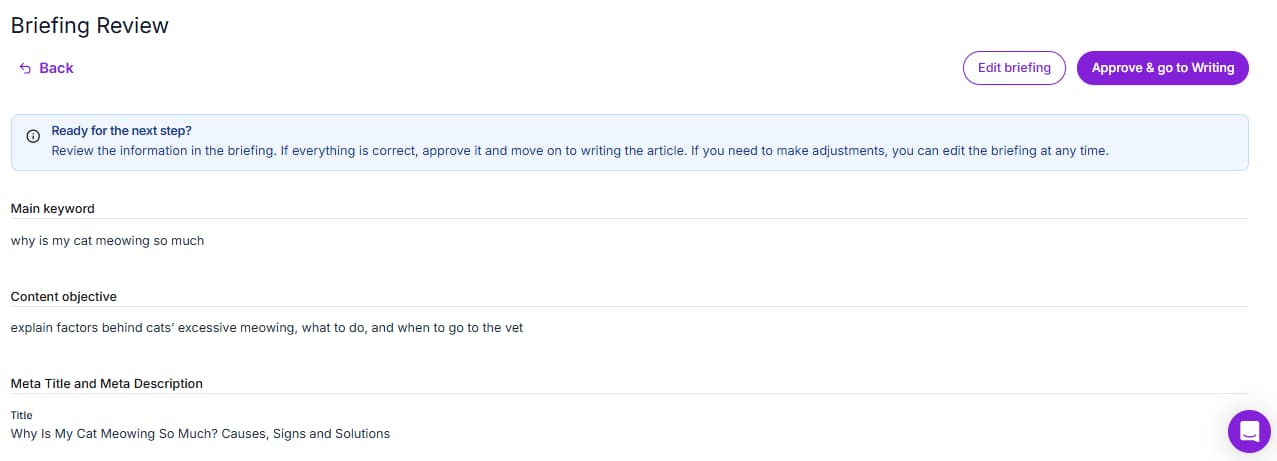
- Need to pause your work? Click “Save draft” so you don’t lose anything and resume editing whenever you want.
- All set? Move forward to view the complete briefing.
- If the structure is perfect, click “Approve and go to writing”. If you notice something still needs tweaking, just go back by clicking “Edit briefing”.

Article Creation
We’ve reached the final stage! When you move on to writing, you’ll find a complete, distraction-free environment to transform your briefing into an article ready to rank. Before you hit play on production, let’s understand how your new workspace works:
Getting to Know the Writing Dashboard
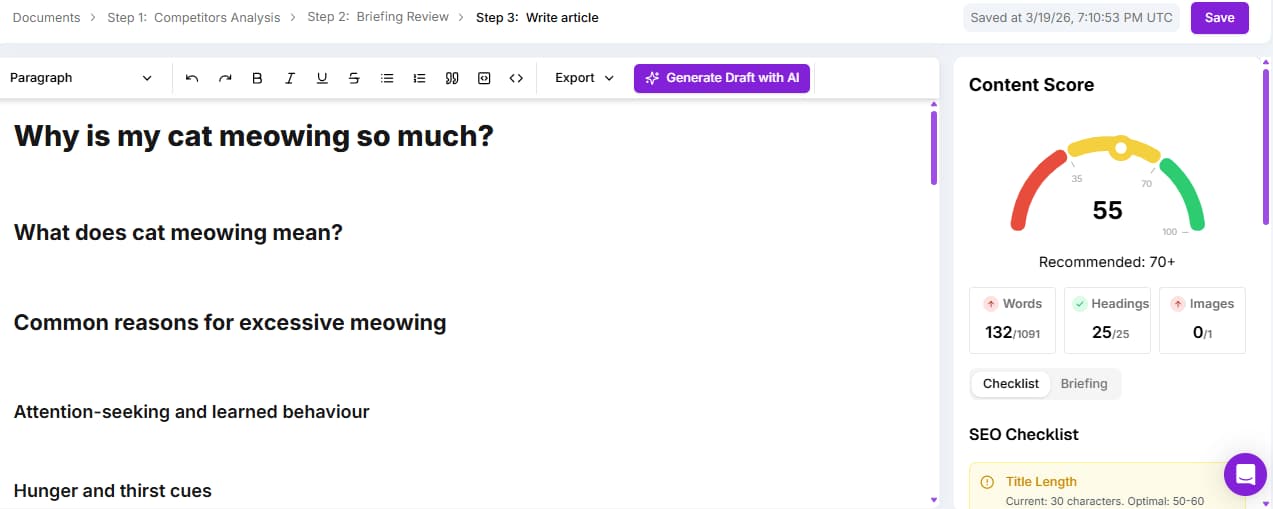
- Text Editor: It comes smartly pre-filled with all the heading tags you approved in the previous step. The skeleton of your text is already done.
- Editing Bar: Here you have control over formatting (bold, italics, underline, quotes, lists, and heading tag levels). This bar is also where you’ll find the “Generate Draft with AI” button, which triggers Niara to write the entire content at once.
- Content Score: Located on the right sidebar, this feature takes into account your briefing details and SEO rules—it analyzes your text in real-time to ensure it aligns with Google’s best practices. The score is divided into three quality levels:
- Below 35: Low quality (requires attention and adjustments).
- From 35 to 70: Medium quality (on the right track, but with room for improvement).
- Above 70: High quality (excellent ranking potential).
The Content Score helps you quickly identify what needs adjusting by evaluating crucial factors like: title length, keyword in title, meta description, content length, number of images, alt text, internal links, presence of H1, H2, and the total number of heading tags.
How to generate your content
With the dashboard mastered, it’s time to bring the text to life. Niara adapts to your workflow, letting you choose how you want to produce:
1. Automatic Generation (Full Draft)
Want to scale your production and save hours of work? Click “Generate Draft with AI” and let Niara write the entire text based on your structure.
![]()
2. Topic by Topic Generation (Copilot)
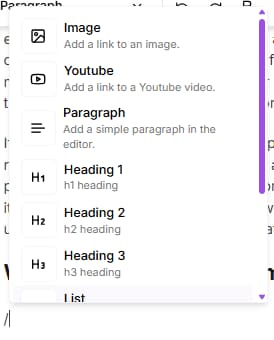
Prefer to build the text in blocks and have more control throughout the process? Place the cursor in the ideal spot and press the spacebar for Niara to write that section. You can also type the “/” key to view a menu with the main quick commands.
3. Manual Writing
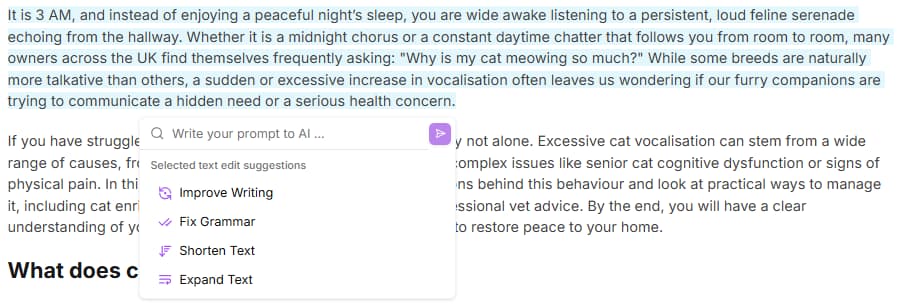
If you want to write the text yourself, the editor is free for you to use. Niara will stay by your side, updating the Content Score as you type. Tip: after writing a section, you can select the content and, in the Niara AI button, ask the tool to correct grammar, improve the text, or write your own prompt in the chat field.
The Differentiator
Unique Content with Your Voice Forget generic and robotic texts. Content Workflow’s great differentiator is context. Every time Niara generates content, she deeply analyzes your Briefing and your Brand Guide. The result is extreme personalization: unique content that respects your company’s guidelines and tone of voice.
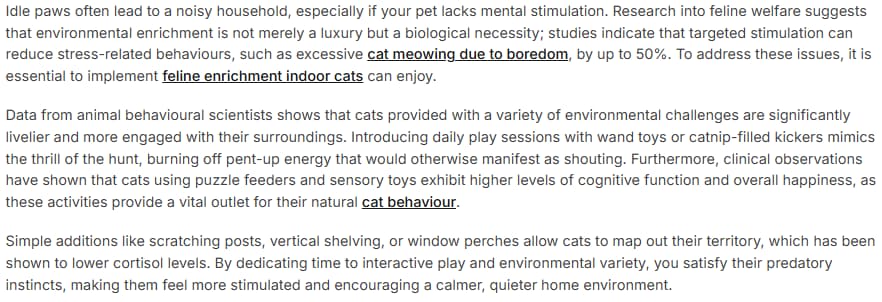
Besides the native options, you have total freedom to write custom commands (prompts) directly in the editor, asking exactly what you want for a paragraph or topic. Just press the spacebar to send your request or select a snippet and click “Niara AI” to complement it however you like.

In the example above, the request was the following: “cite data related to the benefits of environmental enrichment for cats, how much it makes them feel happier, livelier, and more stimulated”. Niara complemented it in the following way:
Exporting your article
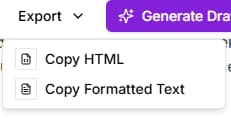
With the text finished and the Content Score high, it’s time to publish. In the top bar of the editor, you’ll see the ‘Export’ option. By clicking it, you can choose between copying the HTML or copying the formatted text.
Then, just paste it directly into your CMS (like WordPress, for example) and your content will be ready to go live, keeping all the original formatting. Simple, fast, and no rework!

Is it possible to save a briefing to finish writing the content later?
Yes, absolutely. We know an SEO professional’s routine is full of interruptions. You don’t have to do it all at once; your strategic work won’t be lost.
- Save Draft: When generating a briefing or content in Content Workflow, you can save this generation in your History. On the home screen, select the “Save draft” option.
- Adjust status: On the Content Workflow home screen, you can change the tool’s status to “Briefing”, “Creation”, or another. This allows you (and your team) to quickly know the content’s status and the next step to be taken.
Niara stores every interaction in a secure cloud database. So, even if your browser closes unexpectedly or the power goes out, the latest version processed by the tool will be available in your account.
Is the content generated by Content Workflow original? Will I have plagiarism issues?
Yes, the content is 100% original and plagiarism-free! You can rest easy. Niara’s Content Workflow doesn’t “copy and paste” from other sites. Our process works like this:

- Smart Analysis: Our tool analyzes competitors and Google only to understand the top-performing content, search intent, and the best structure for the article.
- Creation from scratch: The text is generated from scratch, word by word.
- Your voice: The content is shaped based on the exclusive information you provided in the Briefing and your Brand Guide.
The result is a unique, strategic text that reflects your company.
Does Google penalize texts written by Artificial Intelligence?
No, Google does not penalize content generated by Artificial Intelligence.
Google itself has officially stated that its algorithm doesn’t focus on who or what wrote the text, but rather on the quality of the information. The rule is simple:
- What Google punishes: “Spam” content, mass-generated, unreviewed, and that delivers no value to the reader.
- What Google rewards: Useful, original texts that respect E-E-A-T principles (Experience, Expertise, Authoritativeness, and Trustworthiness).
At Niara, we advocate that AI is your best assistant to eliminate hours of operational work. However, human curation is irreplaceable! With our Content Workflow, the tool does the heavy lifting and accelerates creation, but you’re the one who adds the final strategic touch that Google and your readers value so much.
Does Content Workflow work well for highly technical or specific niches (YMYL)?
Yes! In YMYL (Your Money or Your Life — like Health, Finance, and Law) niches, Niara acts as an advanced research assistant that already understands industry terminology and how to structure reasoning in a didactic, SEO-optimized way.
This happens because, for article content generation, we use the advanced Gemini model – which has the most up-to-date information from the internet. This way, we can deliver well-organized, readable content with the correct technical terms. Your role, as an expert, is to provide the final curation (the E-E-A-T).
You must review sensitive data (like recent laws, dosages, or specific rates) and add your practical experience, such as case studies or nuances the tool might miss. Technology accelerates production and ensures optimization, while you ensure the accuracy and authority of the information.
Can I use Content Workflow to update old articles or only for new ones?
Yes, you can update old texts with Niara’s Content Workflow. The SERP changes constantly, and an article that performed well a year ago might be outdated today.
By running an old post’s keyword through Content Workflow, Niara does an instant audit of what Google and your competitors are prioritizing right now.
The process becomes a content gap analysis: the tool delivers the ideal updated structure, and you compare it with your existing text. Instead of rewriting everything from scratch, you identify which new topics Niara suggested and use ChatSEO to generate only those new sections.
This way, you enrich the content with what it lacks to get back to the top, saving time and ensuring the article meets current search intent.
Does Content Workflow include internal or external linking suggestions?
Content Workflow does not suggest internal and external links, and this is intentional to protect your strategy. Niara focuses on delivering the best textual content possible. Automating internal linking without knowing your site’s complete architecture or page hierarchy could generate irrelevant loops or broken links. But stay tuned. Soon, we will deliver another reliable feature for you!
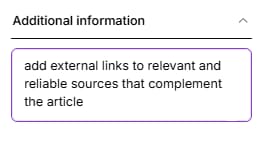
For external linking, you can ask Niara during the Briefing creation stage to add links to relevant and reliable sources. And she will do it automatically during the content generation stage.

Our recommendation: Use the Flow to ensure the content is the best on the SERP. Then, do the internal linking strategically (Clustering) to strengthen your pillar pages.
If you need help, you can list your main URLs in Niara’s ChatSEO and ask: “Based on these URLs I sent you, which ones make sense to link in this new article?“.
Does Content Workflow suggest images or Alt Text during generation?
The tool analyzes the SERP and indicates the average number of images your competitors use, but the choice of where to insert them is yours.
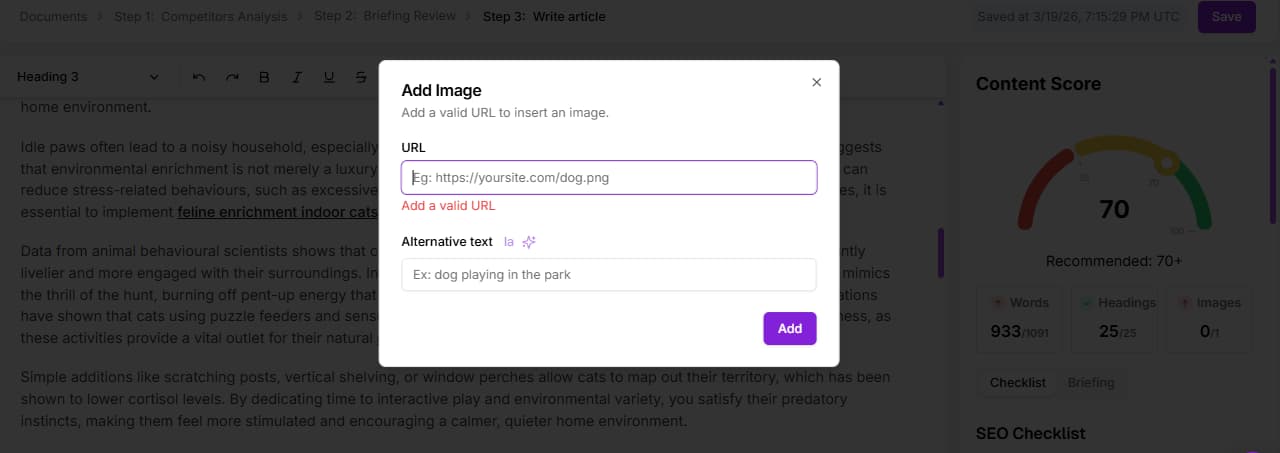
You decide where images make the most sense for the user experience (breaking up large blocks of text, illustrating examples, etc.) and insert them manually directly in Niara’s editor. Just type “/” to find the command and insert via link.

For the images you’ve chosen, you can ask Niara to automatically generate the Alt Text, ensuring accessibility and Image SEO without having to write descriptions from scratch.
Is there a word limit for articles generated by Content Workflow?
There is no fixed or arbitrary word limit; Niara relies on competition data. The tool doesn’t write too little out of limitation, nor too much just to “fill space”. It analyzes the average word count of Google’s first-page results for your keyword and defines the ideal length so you can compete on equal footing.
If competitors on the first page have dense 3,000-word articles, Niara will understand you need depth and will generate robust content. If the answer is simple, it will be objective.
However, you have total control: if you want an article longer than the average, you can make the necessary adjustments in the Briefing stage or during content creation. Niara suggests the competitive baseline, but you define the final depth.

How many Niara credits do I consume when using Content Workflow?
Niara’s Content Workflow consumes only 1 content credit per full article.
That’s right! No matter the size of the text: competitor analysis, briefing, and final writing cost just one action. This saves all your word credits to use strategically in other Niara features, like ChatSEO or Bulk Content creation.

Annual Plan Advantage: When you subscribe to the annual plan, you receive all the year’s credits at once! This means that, on the Solo plan, you start with 96 content credits unlocked (or 720 on the Team plan), plus all word credits multiplied. It’s the freedom you need to scale your production at your own pace, without waiting for the month to turn.
What happens if Content Workflow doesn’t find relevant competitors for my keyword?
Que el Flujo de Contenido no encuentre competidores relevantes es una excelente señal: has encontrado un “Océano Azul”. Significa que la palabra clave es inédita o está muy poco explorada.
En este escenario, la herramienta no te dejará tirado. Niara utilizará el vasto conocimiento de la base de datos de la IA (LLM) para estructurar el mejor artículo posible sobre el tema, guiándose por la lógica semántica y no por la imitación de la competencia.
Esta es tu oportunidad de oro: como no hay nadie a quien “copiar” o superar, el contenido que genere Niara definirá el estándar de calidad para esa búsqueda, posicionando a tu marca como la autoridad pionera en la materia.
What’s the difference between using Content Workflow and asking for a text directly in ChatSEO?
The difference lies in the database: the Flow looks outward (SERP), ChatSEO looks at the AI’s training.
- Content Workflow: Before writing a single word, it goes to Google, analyzes first-page competitors, understands the ranking heading tag structure, and creates a briefing and article based on real competition data. It is ideal for creating content intended to fight for the top positions.
- ChatSEO: It is also an SEO-focused assistant, but it doesn’t take into account Google’s SERP and competitor information for a specific keyword. However, since the Gemini model has a “Search the Web” option, if you need to access and understand specific content, ChatSEO can help you with that demand.
What is Niara’s Google AI Mode Insights?
Google AI Mode Insights is a pioneering diagnostic tool developed by Niara. It is built strictly upon Google’s official engineering documentation regarding AI Overviews (formerly SGE) and the inner workings of Large Language Models (LLMs).
Unlike a traditional SEO audit that focuses merely on keywords and technical aspects, this tool analyzes the semantic depth and true utility of your content. The ultimate goal is to answer one crucial question:
- “Does your content hold the necessary information for Google’s AI and other LLMs to use it as a source in their answers?”
Today, Google doesn’t just want to deliver a blue link; it wants to directly answer the user’s doubt. To achieve this, it uses a concept called Query Fan Out—where the AI essentially “breaks down” a complex question into several smaller, simultaneous sub-questions. Google AI Mode Insights checks if your article covers these sub-questions or if you are leaving content gaps that will allow your competitor to be cited instead of you.
Pro Tip: Because most LLMs use similar Query Fan Out logic, implementing Niara’s Google AI Mode Insights suggestions will also drastically increase your chances of being cited in ChatGPT, Gemini, Perplexity, and other AI platforms.

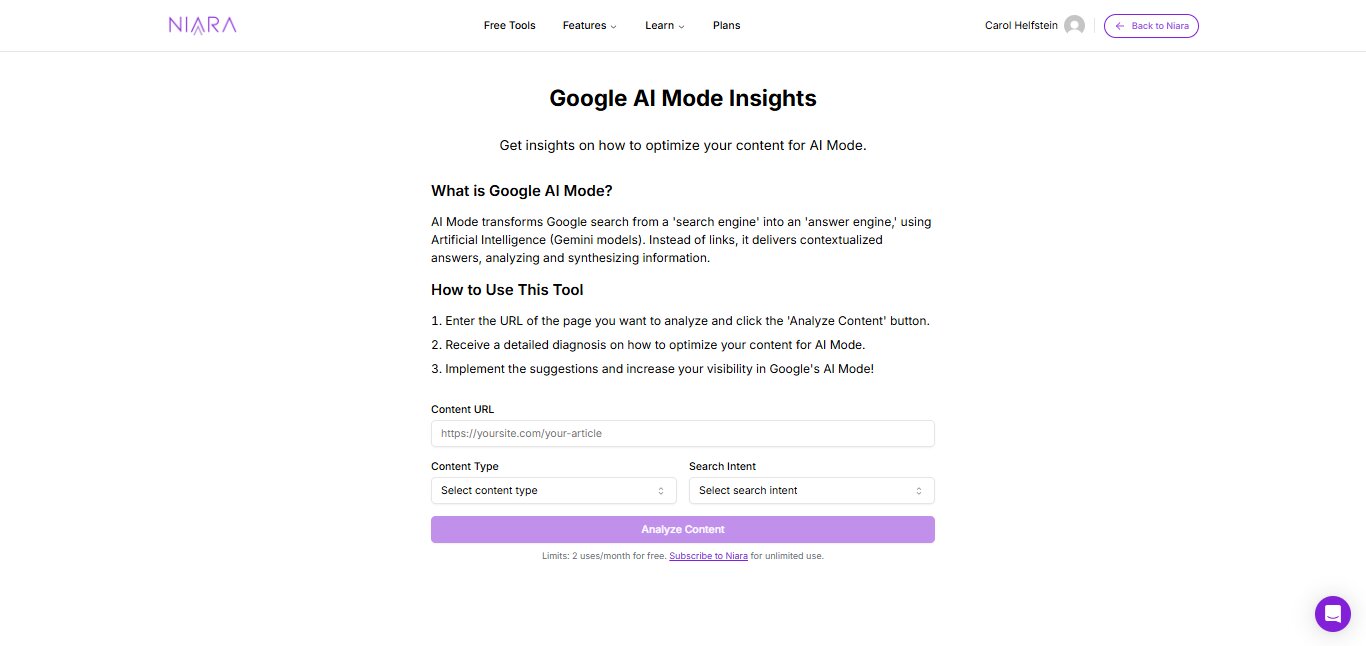
Try it in practice: We have released 2 free trials so you can experience the power of this data engineering right now, no registration required. To scale your strategy and optimize your entire website, Niara subscribers have unlimited access to the tool.
What is ChatSEO?
O ChatSEO da Niara é o seu assistente de inteligência artificial especializado em SEO e Marketing de Conteúdo . Diferente de chatbots genéricos, ele foi treinado e contextualizado para entender as nuances de otimização para motores de busca.
Ele atua como um membro sênior da sua equipe, capaz de realizar tarefas que vão desde ideias de palavras-chave até a análise técnica de dados complexos.
É o ambiente onde você centraliza sua produção e estratégia, com a segurança de que a IA compreende o que é necessário para rankear no Google.
How ChatSEO Works
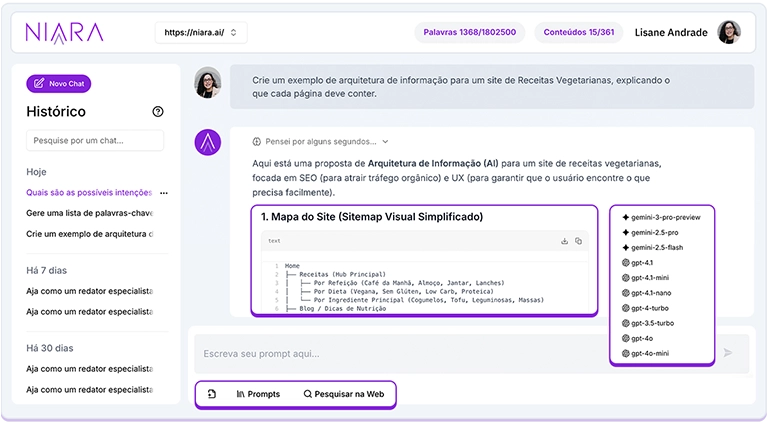
Niara’s ChatSEO combines the power of the most advanced language models on the market (such as OpenAI and Gemini) with Niara’s exclusive data intelligence layer.
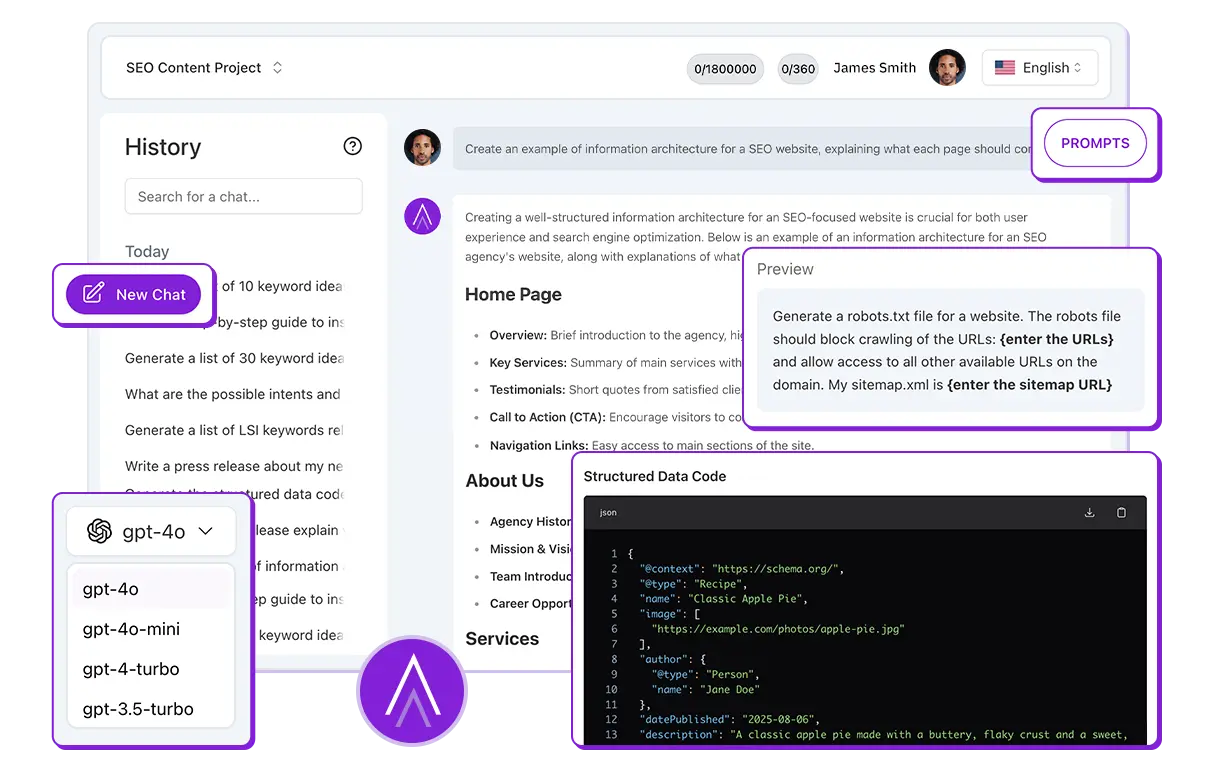
It works conversationally: you type a question or choose one of the available prompt templates in our Prompt Library, and the AI processes the answer considering the best practices of SEO and Digital Marketing.
The major differentiator is integration: ChatSEO can “read” your Google Search Console data (via Search Analytics), analyze files you upload, and, by selecting the Gemini model, access the internet in real time.
Basically, you provide the context or the problem, and ChatSEO delivers the solution—whether it is a text, a keyword table, or a competitor analysis.

Prompt Library
We know that crafting the perfect prompt can be challenging. That is why Niara’s ChatSEO comes equipped with a Prompt Library validated by experts. There are over 50 ready-to-use templates designed to extract the best possible results from the AI with just a few clicks.
Our library covers several essential needs, including:
- Content: Article creation, briefings, and rewriting.
- Keywords: Research, clustering, and search intent.
- Technical SEO: Error analysis, schema markup, and robots.txt.
- E-commerce: Product descriptions and categorization.
- Link Building: Outreach strategies and link profile analysis.
- User Experience (UX): Readability analysis and user journey.
- Local SEO: Optimization for Google Business Profile (GBP) and regional searches.
Simply select the category, fill in the requested fields, and let Niara do the heavy lifting.
Web Search
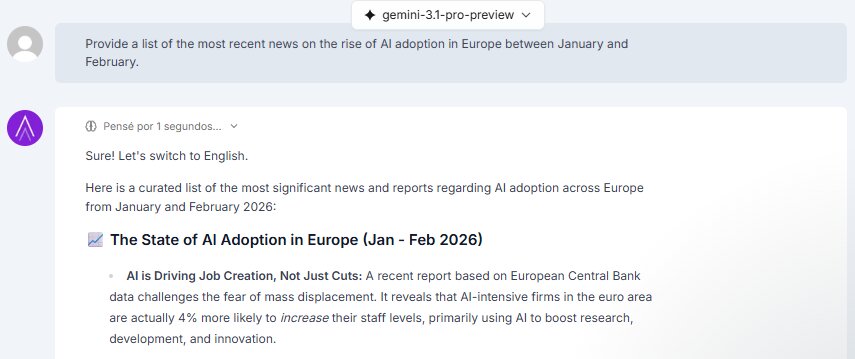
ChatSEO is not limited to its training data alone. With the Web Search feature, Niara can browse the internet to fetch up-to-date information, recent news, or competitor data in real time.

This feature is optional and controlled by you. To use it, you need to select the Gemini model and click on “Web Search” (the magnifying glass icon) in the ChatSEO footer before sending your message. This ensures the AI looks for fresh sources whenever your topic requires current data.

Important: Web Search is exclusive to subscribers. The web browsing functionality is not available during the free trial period. To unlock access to real-time data, you need to upgrade your plan.
Can I attach PDFs or spreadsheets for ChatSEO to analyze and extract insights?
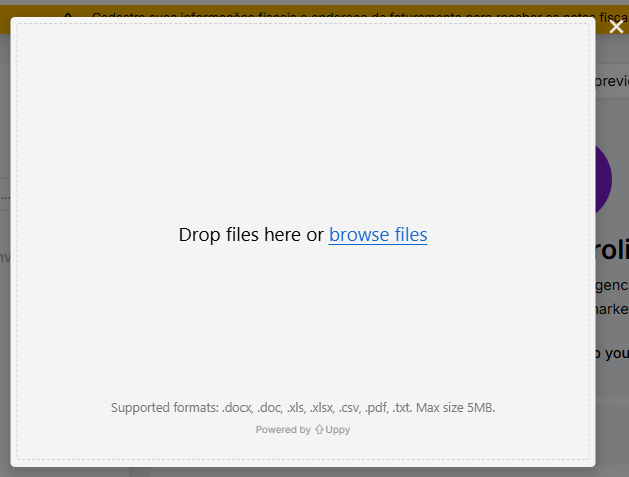
Yes! ChatSEO was designed to eliminate the manual work of cross-referencing data. You can upload files directly in the chat and ask Niara to analyze, summarize, or extract strategic insights in seconds.
This is part of what we call Conversational Analytics: instead of wasting hours on complex spreadsheets, you “talk” to your data.
For example, attach a performance report and ask: “Identify the top 3 traffic drop patterns in this report and suggest corrective actions.”

What file formats does ChatSEO accept for upload?
Niara is flexible to adapt to your workflow. The ChatSEO feature accepts the main file formats used in the daily routine of marketing and SEO professionals, including:
- Text documents: PDF, DOCX, DOC, TXT.
- Spreadsheets and data: CSV, XLS, XLSX (Excel).
Simply click the file icon in the ChatSEO footer, attach your file, and start chatting with it.

How Google AI Mode Insights Works
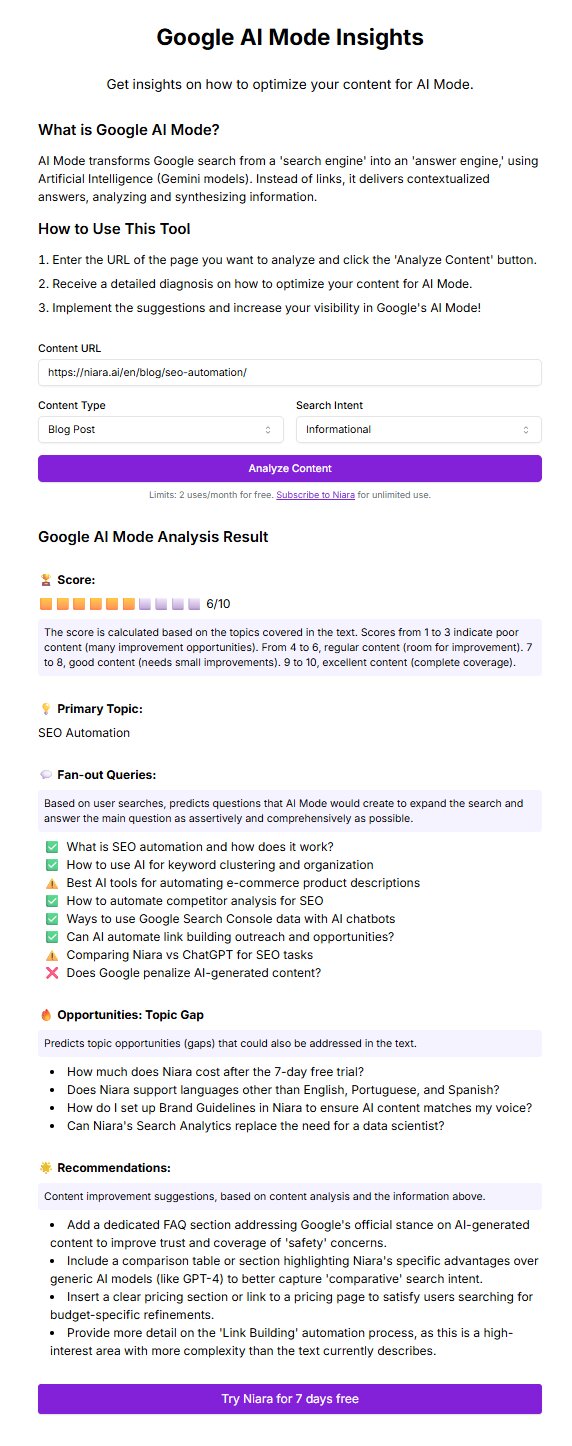
The way Niara’s Google AI Mode Insights works is incredibly simple for you, but it runs a highly complex analysis behind the scenes. The process happens in three main steps:
- Data Input: You simply provide the URL of the page you want to analyze, the content type, and the search intent.
- Simulation and Gap Analysis: Niara acts as a “simulator” for Google’s algorithm. It reads your content and cross-references it with what is expected of a complete answer for that central theme, based entirely on AI Mode criteria. It identifies what we call Information Gain and Content Gaps.
- Actionable Diagnostics: In just a few seconds, the tool delivers a comprehensive report with insights on how to optimize your content:
- Main Theme: The core topic of your content.
- Query Fan Out: Which topics your content already covers, which ones it addresses only averagely, and suggestions for new subtopics that, if added, will drastically increase your chances of being cited in AI Overviews.
- What’s Missing (Gaps): Clear opportunities for topics that must be addressed to answer all user doubts regarding the central theme.
- Recommendations: Pragmatic suggestions for content improvements to make it even more complete for AIs, such as adding tables, videos, layout adjustments, and structured data.
Pro Tip: Beyond your internal content, you can also use Google AI Mode Insights to analyze your competitors’ URLs, allowing you to reverse-engineer their strategy and create a far superior piece of content.

Is the generated content plagiarism-free?
Niara’s ChatSEO uses Generative Artificial Intelligence to create text word by word, based on language patterns and the data you provide. The more information and context you give, the more personalized and unique the content generated by Niara will be.
However, as SEO experts, we always reinforce: AI is a powerful assistant, but human curation is irreplaceable.
We recommend that you always review the content, check the accuracy of the information, and add your expert touch (or your brand’s voice) to ensure higher quality, meet Google’s E-E-A-T criteria, and avoid any similarity with existing content.
How long does it take for Niara to analyze my page and generate recommendations?
Google AI Mode Insights works in a matter of seconds. On average, the complete process takes less than 1 minute. While a manual analysis of semantic nuances and Query Fan Out would take you hours of study and spreadsheet comparisons, Niara processes your content’s structure and cross-references it with Google’s patterns instantly.
We deliver agility so you can focus on strategy.
Does ChatSEO understand and apply E-E-A-T concepts (Experience, Expertise, Authoritativeness, and Trustworthiness)?
Yes, absolutely. ChatSEO was trained based on Google’s quality guidelines and deeply understands the pillars of Experience, Expertise, Authoritativeness, and Trustworthiness.
You can (and should) ask Niara’s chatbot to analyze content from an E-E-A-T perspective or ask for suggestions to increase the perception of authority in a text.
However, remember our vision: AI covers the theory, but the real “Experience” comes from you. Niara helps structure and format knowledge, but it is your validation and your expert insights that guarantee the content truly demonstrates the real-world experience necessary to rank well.
Can I use Google AI Mode Insights to analyze unpublished pages (drafts)?
No. For Google AI Mode Insights to work correctly, our tool needs to “read” the code and content of an active page, simulating the exact behavior of Google’s crawler. Therefore, you must provide a public, published URL.
Expert Tip: If you want to analyze a draft before hitting publish, we highly recommend using our ChatSEO. You can paste your text there and ask for a preliminary analysis using the prompts available in our Prompt Library.
Can I save my favorite prompts to use again later?
Saving custom prompts in the Prompt Library is an exclusive feature of the Enterprise plan.
We understand that large operations require standardized processes. That is why, in the Enterprise plan, Niara acts as an extension of your team:
- Customization: We create an exclusive category for your company within the Prompt Library.
Management: Our team configures and saves the prompts your team uses the most, ensuring everyone follows the same methodology. - Automation at Scale: In addition to the library, Enterprise clients have access to the customization of the Mass Content feature and the creation of Tasks (AI agents) trained specifically for your company’s routines.
Does the diagnostic work for any type of page?
Yes! Niara’s Google AI Mode Insights is versatile and designed to analyze your site’s main structures across different search intents (informational, navigational, commercial, or transactional). You can run the diagnostic on:
- Blog Pages: To ensure depth and cover critical content gaps.
- Homepages: To verify if your main structure communicates brand authority effectively.
- Product Pages: Essential for e-commerce, helping identify if your product description actually answers the user’s pre-purchase questions.
- Landing Pages: To optimize semantic relevance and boost conversion.
Google’s AI pulls information from your entire site’s ecosystem, which is why our tool doesn’t restrict its analysis to just blog articles.
Is there a word or interaction limit per day in ChatSEO?
The usage volume of ChatSEO is defined by your subscription plan (Solo, Team, or Enterprise).
Each plan has a monthly credit allocation that is consumed as Niara generates words in ChatSEO (the answers to your requests).
On the Solo plan, there is a credit limit, but if you are a beginner content creator or freelancer, it might be enough for your production and optimization routine.
On the Team and Enterprise plans, your team can use ChatSEO and Tasks unlimitedly! This is great for teams that want to scale content production without worrying about limitations.
Does Google AI Mode Insights rewrite the content for me, or does it just give recommendations?
Google AI Mode Insights focuses exclusively on strategic diagnostics. It acts as your senior SEO consultant, pointing out exactly where the content gaps are, which subtopics are missing, and how to improve your structure.
It does not rewrite the text automatically. But solving this is simple: you can copy the generated recommendations and use Niara’s ChatSEO to expand the topics or rewrite the suggested paragraphs. This ensures the final human curation—the irreplaceable touch—stays in your hands.
If you need to create an entirely new article to revamp what’s already live, you can also use our Content Workflow.
How can I ensure the text has my brand’s tone of voice and doesn’t sound robotic?
The most efficient way is to define this even before generating your first text in Niara. In the Project Settings, you can insert your Brand Guidelines.
By doing this, Niara understands your company’s identity and automatically applies these guidelines across all features—whether in ChatSEO, Content Flow, or Tasks. The generated content is “born” aligned with your style, without you having to repeat instructions for every command.
Beyond this global setting, you can refine the result by attaching context files in the ChatSEO feature or asking the Article Editor AI, within the Content Flow, to further personalize the generated content.
But remember: Niara creates the perfect base, and your final review is what guarantees naturalness and human connection.
Does optimizing my content with Google AI Mode Insights also help me appear in ChatGPT, Gemini, and other AIs?
Yes, absolutely! Optimizing your content with Niara’s Google AI Mode Insights significantly increases your chances of being cited not only on Google (AI Overviews) but also on ChatGPT, Gemini, Perplexity, Claude, and other Large Language Models.
Many of our clients report that, after applying the tool’s diagnostics, they started appearing as sources across these other AI platforms. This happens for a very clear technical reason: the leading AIs share similar information retrieval logic.
Here is why this works in practice:
- The Power of Query Fan Out: Most modern LLMs use search branching. When a user asks a complex question, the AI doesn’t perform a single search; it breaks the doubt down into several simultaneous sub-queries to build the most comprehensive answer.
- Gap Coverage: Our tool was designed based on official documentation to diagnose exactly this. It points out which topics, entities, and information gaps are missing on your page so it can answer all these branches.
- AI-Friendly Structure: By adjusting your content with Niara’s recommendations, you create an information-dense text that is well-structured and easy for bots to parse (whether they belong to Google or OpenAI).
In short: Although the feature is focused on Google’s guidelines, Generative Engine Optimization (GEO) practices are universal. By preparing your content for Google AI Mode, you are actually future-proofing your site to dominate the new era of generative search across any platform.
Does ChatSEO keep my chat history so I can continue later?
Yes. Your productivity cannot be interrupted. ChatSEO automatically saves the history of your interactions.
You can access old conversations at any time to:
- Continue a strategy from where you left off.
- Review previously generated insights.
- Reuse contexts that have already been worked on.
This eliminates the need to explain everything “from scratch” to Niara every time you work on a recurring project.
Does optimizing for Google AI Mode replace the traditional SEO I already do?
Not at all! Think of AI optimization as the natural evolution of SEO, not a replacement. For an Artificial Intelligence to cite your content in an AI Overview, it first needs to find, crawl, and trust your page.
This means that technical SEO (site speed, structured data, indexing) and authority (E-E-A-T) continue to be the foundation of everything.
What Google AI Mode Insights does is take a page that already has ranking potential and polish it into the exact format that LLMs prefer to read: higher information density, answering multiple search intents, and covering all angles of the subject.
Can I use ChatSEO to create topic clusters based on real keywords?
Yes, and this is one of our biggest competitive advantages. Unlike generic AI tools, Niara’s ChatSEO connects directly to your data.
You have two powerful ways to do this:
- Conversational Analytics: If your project is connected to Google Search Console via Niara, you can ask ChatSEO: “@gsc Analyze my top 50 keywords with the most impressions in the last 30 days and group them into topic clusters by search intent.” It will use your real performance data. Whenever you want to query performance data, add “@gsc” at the beginning of the prompt and indicate the analysis period so Niara knows which data to collect.
- File Upload: You can export your keyword list from other tools (CSV or Excel), attach it in ChatSEO, and ask for the clustering.
Pro Tip: For very large volumes of data, we recommend using our specific Clustering Task in the Tasks area, which was trained exclusively to process thousands of terms and organize your information architecture in minutes.
If I apply all the recommendations from the Google AI Mode Insights diagnostic, am I guaranteed to appear in the AI Overviews?
At Niara, we are transparent: there are no absolute magic guarantees in SEO, whether in traditional search or AI-generated answers. Google’s algorithm evaluates hundreds of factors in real-time, including your domain’s historical data and E-E-A-T (Experience, Expertise, Authoritativeness, and Trustworthiness).
However, what Google AI Mode Insights does is put the mathematical probability in your favor. By basing our diagnostics purely on Google’s official documentation, we eliminate guesswork.
Applying these recommendations ensures your content has the exact structure, depth, and entities that AIs look for when formulating an answer. You stop relying on luck and start leveraging data engineering.
Can I share a ChatSEO conversation with another member of my team?
No, currently it is not possible to share the link of a conversation in Niara.
The ChatSEO history is individual and private for each logged-in user. If you generated an important strategy or content and need your team to see it, you will need to copy the generated text or data and send it externally (via email, Slack, or Docs).
Important: In team plans, the shared features are Content Flow and Mass Content. The others are private to each user.
Can I use Google AI Mode Insights to update old content on my site?
Yes, and this is one of the most profitable strategies you can apply! Updating old content (combating the famous content decay) usually brings faster results than starting an article from scratch.
You can insert the URL of an existing article or landing page into Google AI Mode Insights. Niara will analyze your current text and point out exactly where the information gaps are. With these recommendations, you can enrich old content in minutes, making it highly relevant again for both traditional search and new generative AIs. It means saving time and bringing scale to your SEO routine.
How Niara Can Help You
We know the SEO grind: dozens of open tabs, endless spreadsheets, and disconnected tools. Niara was built to solve exactly that. We are an all-in-one platform that combines data intelligence with the power of cutting-edge AI (OpenAI and Gemini).
Here’s what you achieve with Niara:
- Operational Speed (10x faster): Let Niara handle the repetitive heavy lifting, like bulk meta description generation, content briefings, or keyword clustering.
- Real Data-Driven Decisions: Unlike other AIs that hallucinate, ChatSEO (when using Gemini models) and Niara’s Content Workflow pull real-time data straight from the SERPs and your own Google Search Console.
- No More Writer’s Block: Leverage our ChatSEO Prompt Library and ready-made workflows to generate outlines, articles, and optimizations in seconds.
- Deep Analytics: With Search Analytics, you unlock 5x more data than the standard Google Search Console interface. Dive into exclusive reports and uncover hidden traffic opportunities.
Your goal is traffic and conversions; ours is to give you the tools to get there faster.
How to Make the Most of Your 7-Day Free Trial
We believe the best way to understand Niara’s value is by seeing it in action on your own projects. That’s why we offer a 7-day free trial for you to explore our features.
Here’s how your trial works:
- Full Access: For 7 days, you can test essential features like ChatSEO, Search Analytics, and Content Workflow.
- Data Connection: We highly recommend connecting your Google Search Console (GSC) right away to see the magic happen with your own data.
- Security: Your data is yours. We follow strict security protocols and a Zero Data Retention (ZDR) policy—meaning your data is never used to train the AI.
Pro Tip: Don’t just “look around” during these 7 days. Create an article, run a keyword analysis, or optimize an existing page. Niara is an action-driven tool.
Note: Our free trial requires no credit card and has no auto-renewal. At the end of the trial, you don’t need to cancel anything; your access simply pauses. You only subscribe to a plan (Solo, Team, or Enterprise) if you want to keep growing with us.
First Steps
Welcome to Niara! If you’ve just arrived, enjoy the features—our workflow is designed to be intuitive.
When accessing the tool for the first time, you’ll go through a quick onboarding. These steps are essential for us to calibrate Niara AI according to your needs. Here is how it works:
1. Define the Scope:
- Add your website: Enter the URL of the site you’ll be working on.
- Choose your Goal: What do you need to do right now? Select options like Create briefings, Generate optimized articles, E-commerce content, or Analyze marketing data.
- Experience Level: Tell us if you are a beginner or an SEO expert, so we can adjust the level of our suggestions.
2. Understand your Initial Credits: Upon reaching the Dashboard (main screen), you’ll have immediate access to the free plan, which includes:
- 2 Credits for the Content Workflow (Briefings and full Articles).
- 5,000 Words to use freely in ChatSEO, Bulk Content and other features.

Pro Tip: Keep an eye on the onboarding missions at the top of the screen to earn extra credits!
3. Strategic Setup (Crucial Step): Before you start generating content, we highly recommend going to “Project Settings” (click the gear icon in the sidebar). There you should:
- Connect Google Search Console: So Niara can analyze your real data, not just generic web data.
- Add Brand Guidelines: Insert your company’s tone of voice, target audience, and rules. This ensures the AI writes like you, avoiding robotic texts.
Your “Day 1” Roadmap. To make the most of your first day, follow this script:
- Connect Google: This is the most important step. With it, Niara becomes your Data Analyst.
- Explore ChatSEO: Go to the “ChatSEO” tab and try chatting with your data. To talk to your Search Console data, start your prompt with the “@gsc” trigger. Try a prompt like: “@gsc List the 5 pages with the biggest drop in clicks last month and suggest optimizations.”
- Create your first high-performance article: Access the Content Workflow, enter a keyword you want to rank for, and watch Niara analyze the SERP and build a complete briefing for you.
Ready to simplify your SEO? The dashboard is all yours.
How to Set Up Your Account
Keeping your account properly configured ensures you receive the right notifications and that your team (if applicable) has the proper access.
Step-by-step setup:
- Access your Profile: In the top right corner of the dashboard, click on your avatar or name and select “My Account.” In this tab, you can view your current plan, check your credit consumption (generated words/analyses), and upgrade or downgrade as needed.
- Billing: Make sure your email and personal information are correct. To ensure you receive your invoice with the right details, billing information must be provided before subscribing to a plan.
- Members: In this tab, you can add new team members (9,90 €/month on the Team plan, or customized according to your needs on the Enterprise plan).
If you are on a Team or Enterprise plan, this is the section where you can invite new members to collaborate on your projects.
Note: To guarantee total security for your company’s data, Niara requires each invited user to connect their own Google Search Console (GSC) account. This ensures that only people with active access in Google can view the project’s metrics.
How to Connect Niara to Google Search Console (GSC)
The real magic of Niara happens when we combine AI creativity with your website’s actual data. When you connect Google Search Console, you stop guessing and start making strategic decisions based on exactly how Google sees your pages.
Why should you connect? Without GSC, Niara can still assist you with general data, but you miss out on real numbers, deep personalization, and analytical speed. Once Search Console is connected, Niara transforms into your Senior Data Analyst—capable of instantly identifying traffic drops, hidden keyword opportunities, and content cannibalization.
Quick step-by-step guide:
- On the left sidebar menu, go to “Projects”.
- Select the desired project (or create a new one) and click the “Settings” gear icon.
- Look for the “Google Search Console Integration” option and click “Connect”.
- Log in with the Google account that manages the website’s property.
- Select the correct property (URL) and confirm.
Security First: We use the official Google API. Following our strict Zero Data Retention (ZDR) policy, your data is used exclusively for your own analyses. It is never shared, nor is it ever used to train third-party AI models. Your data is yours.
Is It Possible to Integrate Niara With My Website or CMS?
We know SEO doesn’t end with text creation; it needs to go live. To accelerate your routine and reduce operational friction, Niara makes it easy to send everything you produce directly to your Content Management System (CMS) or sales platform. The tool does the heavy lifting, you apply your strategic curation, and publishing happens much faster.
Main integration and export features:
- Export in HTML: Copy the formatted text or HTML code to publish the articles generated in the Content Workflow directly to your blog. All formatting, images, and meta tags are preserved, saving precious minutes of editing.
- API (Enterprise): For large operations and engineering teams, we offer API access to integrate all of Niara’s intelligence into your own systems, proprietary CMSs, and internal dashboards with total security.
Our goal is to eliminate unnecessary “Ctrl+C / Ctrl+V” and make your content flow from ideation to publication in record time. We simplify SEO so you can focus on what really matters: scaling your results.
Feature Customization
One of the biggest pain points when using AI is generic content. At Niara, we solve this by letting you set the “rules of the game” before you even start writing.
What you can customize:
- Project Guidelines: In “Project Settings,” define the Tone of Voice (e.g., “Relaxed and Technical”), the Target Audience, and essential information about your company. Niara will read this before generating any text.
- Article Structure: In the Content Workflow, you have total freedom to edit, add, or remove H2s and H3s suggested by the AI before the final draft, ensuring the structure meets your strategy.
Furthermore, we know every business has a unique workflow. That’s why Niara was designed not just as an “out-of-the-box” tool, but as a platform that adapts to your company’s rules and needs.
For large operations, we go further with the Enterprise plan. We tailor the tool to your specific needs, which includes:
- Customization of credit and user limits.
- Creation of exclusive AI Agents, trained to execute your team’s complex routines.
Whether you are a solo consultant or a large corporation, the tool molds to your challenge.
Supported Languages
SEO has no borders, and neither does Niara. If you manage international websites or plan to expand your operation to other markets, our platform is ready to accompany you.
Currently, Niara can analyze data, generate briefings, and write complete articles in:
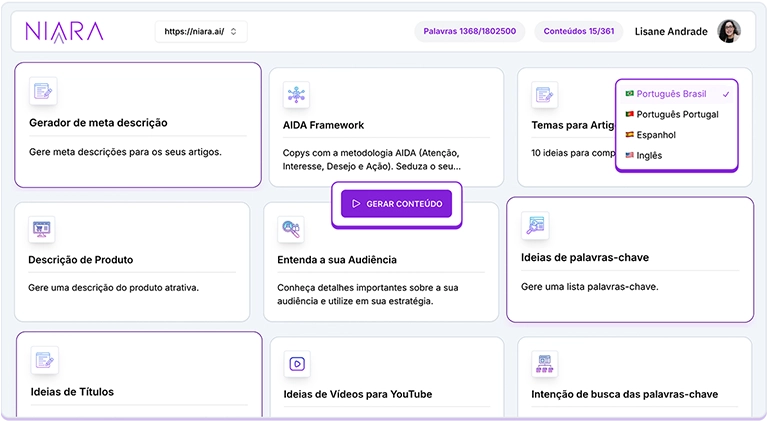
- Portuguese (BR and PT)
- English
- Spanish
How it works: When starting a new Content Workflow or chatting with ChatSEO, you can instruct the AI to generate the response in the desired language. Additionally, within the SEO & Marketing Tasks tools, you can define which language you want to see the result in.
If you prefer to change the interface language entirely, access My Account > Preferred Language.

This is ideal for creating local versions of your website or targeting international SERPs with the same technical quality you use in your home market.