Understand how to use Niara’s ChatSEO to eliminate repetitive tasks, analyze complex files, and scale your content production with technical quality.
O ChatSEO da Niara é o seu assistente de inteligência artificial especializado em SEO e Marketing de Conteúdo . Diferente de chatbots genéricos, ele foi treinado e contextualizado para entender as nuances de otimização para motores de busca.
Ele atua como um membro sênior da sua equipe, capaz de realizar tarefas que vão desde ideias de palavras-chave até a análise técnica de dados complexos.
É o ambiente onde você centraliza sua produção e estratégia, com a segurança de que a IA compreende o que é necessário para rankear no Google.
Niara’s ChatSEO combines the power of the most advanced language models on the market (such as OpenAI and Gemini) with Niara’s exclusive data intelligence layer.
It works conversationally: you type a question or choose one of the available prompt templates in our Prompt Library, and the AI processes the answer considering the best practices of SEO and Digital Marketing.
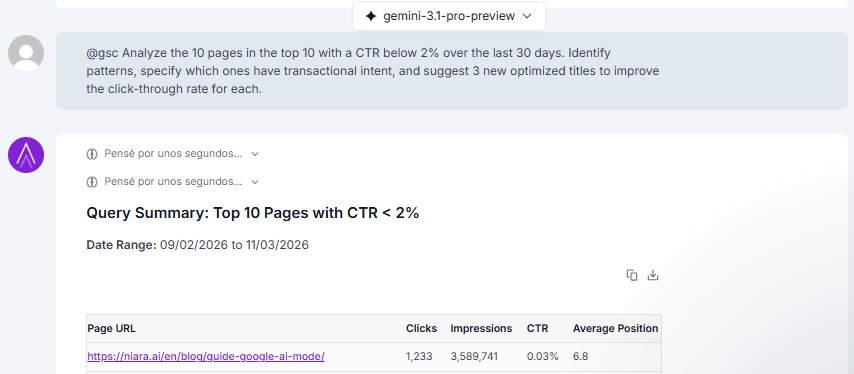
The major differentiator is integration: ChatSEO can “read” your Google Search Console data (via Search Analytics), analyze files you upload, and, by selecting the Gemini model, access the internet in real time.
Basically, you provide the context or the problem, and ChatSEO delivers the solution—whether it is a text, a keyword table, or a competitor analysis.

We know that crafting the perfect prompt can be challenging. That is why Niara’s ChatSEO comes equipped with a Prompt Library validated by experts. There are over 50 ready-to-use templates designed to extract the best possible results from the AI with just a few clicks.
Our library covers several essential needs, including:
Simply select the category, fill in the requested fields, and let Niara do the heavy lifting.
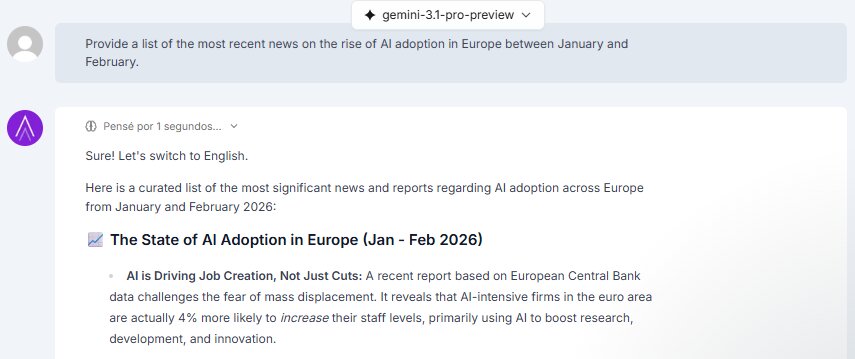
ChatSEO is not limited to its training data alone. With the Web Search feature, Niara can browse the internet to fetch up-to-date information, recent news, or competitor data in real time.

This feature is optional and controlled by you. To use it, you need to select the Gemini model and click on “Web Search” (the magnifying glass icon) in the ChatSEO footer before sending your message. This ensures the AI looks for fresh sources whenever your topic requires current data.

Important: Web Search is exclusive to subscribers. The web browsing functionality is not available during the free trial period. To unlock access to real-time data, you need to upgrade your plan.
Yes! ChatSEO was designed to eliminate the manual work of cross-referencing data. You can upload files directly in the chat and ask Niara to analyze, summarize, or extract strategic insights in seconds.
This is part of what we call Conversational Analytics: instead of wasting hours on complex spreadsheets, you “talk” to your data.
For example, attach a performance report and ask: “Identify the top 3 traffic drop patterns in this report and suggest corrective actions.”

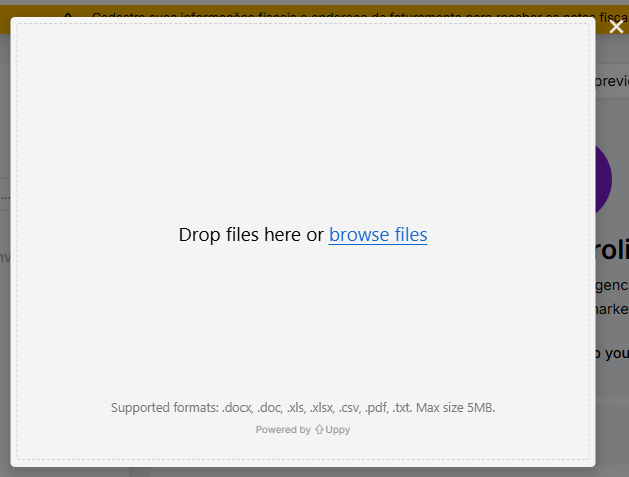
Niara is flexible to adapt to your workflow. The ChatSEO feature accepts the main file formats used in the daily routine of marketing and SEO professionals, including:
Simply click the file icon in the ChatSEO footer, attach your file, and start chatting with it.

Niara’s ChatSEO uses Generative Artificial Intelligence to create text word by word, based on language patterns and the data you provide. The more information and context you give, the more personalized and unique the content generated by Niara will be.
However, as SEO experts, we always reinforce: AI is a powerful assistant, but human curation is irreplaceable.
We recommend that you always review the content, check the accuracy of the information, and add your expert touch (or your brand’s voice) to ensure higher quality, meet Google’s E-E-A-T criteria, and avoid any similarity with existing content.
Yes, absolutely. ChatSEO was trained based on Google’s quality guidelines and deeply understands the pillars of Experience, Expertise, Authoritativeness, and Trustworthiness.
You can (and should) ask Niara’s chatbot to analyze content from an E-E-A-T perspective or ask for suggestions to increase the perception of authority in a text.
However, remember our vision: AI covers the theory, but the real “Experience” comes from you. Niara helps structure and format knowledge, but it is your validation and your expert insights that guarantee the content truly demonstrates the real-world experience necessary to rank well.
Saving custom prompts in the Prompt Library is an exclusive feature of the Enterprise plan.
We understand that large operations require standardized processes. That is why, in the Enterprise plan, Niara acts as an extension of your team:
The usage volume of ChatSEO is defined by your subscription plan (Solo, Team, or Enterprise).
Each plan has a monthly credit allocation that is consumed as Niara generates words in ChatSEO (the answers to your requests).
On the Solo plan, there is a credit limit, but if you are a beginner content creator or freelancer, it might be enough for your production and optimization routine.
On the Team and Enterprise plans, your team can use ChatSEO and Tasks unlimitedly! This is great for teams that want to scale content production without worrying about limitations.
The most efficient way is to define this even before generating your first text in Niara. In the Project Settings, you can insert your Brand Guidelines.
By doing this, Niara understands your company’s identity and automatically applies these guidelines across all features—whether in ChatSEO, Content Flow, or Tasks. The generated content is “born” aligned with your style, without you having to repeat instructions for every command.
Beyond this global setting, you can refine the result by attaching context files in the ChatSEO feature or asking the Article Editor AI, within the Content Flow, to further personalize the generated content.
But remember: Niara creates the perfect base, and your final review is what guarantees naturalness and human connection.

Yes. Your productivity cannot be interrupted. ChatSEO automatically saves the history of your interactions.
You can access old conversations at any time to:
This eliminates the need to explain everything “from scratch” to Niara every time you work on a recurring project.
Yes, and this is one of our biggest competitive advantages. Unlike generic AI tools, Niara’s ChatSEO connects directly to your data.
You have two powerful ways to do this:
Pro Tip: For very large volumes of data, we recommend using our specific Clustering Task in the Tasks area, which was trained exclusively to process thousands of terms and organize your information architecture in minutes.
No, currently it is not possible to share the link of a conversation in Niara.
The ChatSEO history is individual and private for each logged-in user. If you generated an important strategy or content and need your team to see it, you will need to copy the generated text or data and send it externally (via email, Slack, or Docs).
Important: In team plans, the shared features are Content Flow and Mass Content. The others are private to each user.
Converse com a nossa equipe e conheça a fundo como a Niara poderá contribuir para aumentar a produtividade e eficiência de seu time de SEO e Marketing.