Imagine you are browsing a website looking for crucial information about a product. You scroll down the page, click through menus, but the answer simply isn’t there. Frustrating, right? And what do most people do? Close the tab and go to a competitor.
As SEO and marketing professionals, we know that User Experience (UX) is non-negotiable. Whether you run an e-commerce store or a corporate website, having a dedicated space for an FAQ (Frequently Asked Questions) is not just a detail; it is a retention and conversion strategy.
An FAQ acts as a guide that anticipates doubts, overcomes sales objections, and, of course, relieves your support team. But creating an FAQ manually, trying to “guess” what the customer wants to know, is a slow and often inaccurate task.
In this article, I will show you how to stop guessing and use Niara’s artificial intelligence to create a strategic, organized, and optimized FAQ in minutes, not hours.
What is an FAQ and why is it vital for business?
FAQ stands for Frequently Asked Questions. It is a section of your website dedicated to answering your audience’s most common queries directly and objectively.
But let’s go beyond the basics. Why is a well-crafted FAQ an asset to your business?
- Save Time and Resources: Imagine reducing repetitive support tickets (like “what is the delivery time?” or “what are the payment methods?”) by 30%. An FAQ resolves this through self-service, allowing your team to focus on complex issues.
- Authority and Trust: Responding promptly demonstrates transparency and knowledge about what you sell.
- SEO Benefits: Google loves FAQs. Well-structured pages with questions and answers have a high chance of appearing in Featured Snippets (that “position zero” at the top of search results) or in the “People Also Ask” section of the SERP.
How to identify user FAQs?
The biggest mistake when creating an FAQ is answering what you think is important, not what the customer wants to know. To be assertive, we need data.
There are manual methods and automated methods to discover these questions:
1. Manual Methods (Important, but labor-intensive)
- Support Analysis: Talk to your support or sales team. They know exactly what the customers’ pain points are.
- Social Media and Comments: Monitor what people are asking on Instagram, LinkedIn, or Google Business Profile reviews.
- Forums and Communities: Sites like Reddit or Facebook groups in your niche are gold mines for understanding the audience’s real struggles.
2. The Accelerated Method with Niara
Doing this manual research can take hours. With Niara, we shorten this path. Our AI analyzes patterns and suggests questions based on the context of your product or service. Additionally, if you use our Search Analytics feature, you can identify queries (search terms) that are already driving traffic to your site and turn them into questions and answers.
Step-by-step: How to create an FAQ in Niara in minutes
Forget the blank screen. Let’s use AI to generate the structure and content of your FAQ.
1. Access Niara
Log in to your account. If you don’t have one yet, sign up here and enjoy the free trial to test it out.
2. Choose the right tool
You have two powerful paths here:
- Tasks: Go to the Tasks library and select “FAQ Generator”. This is ideal for generating quick ideas.
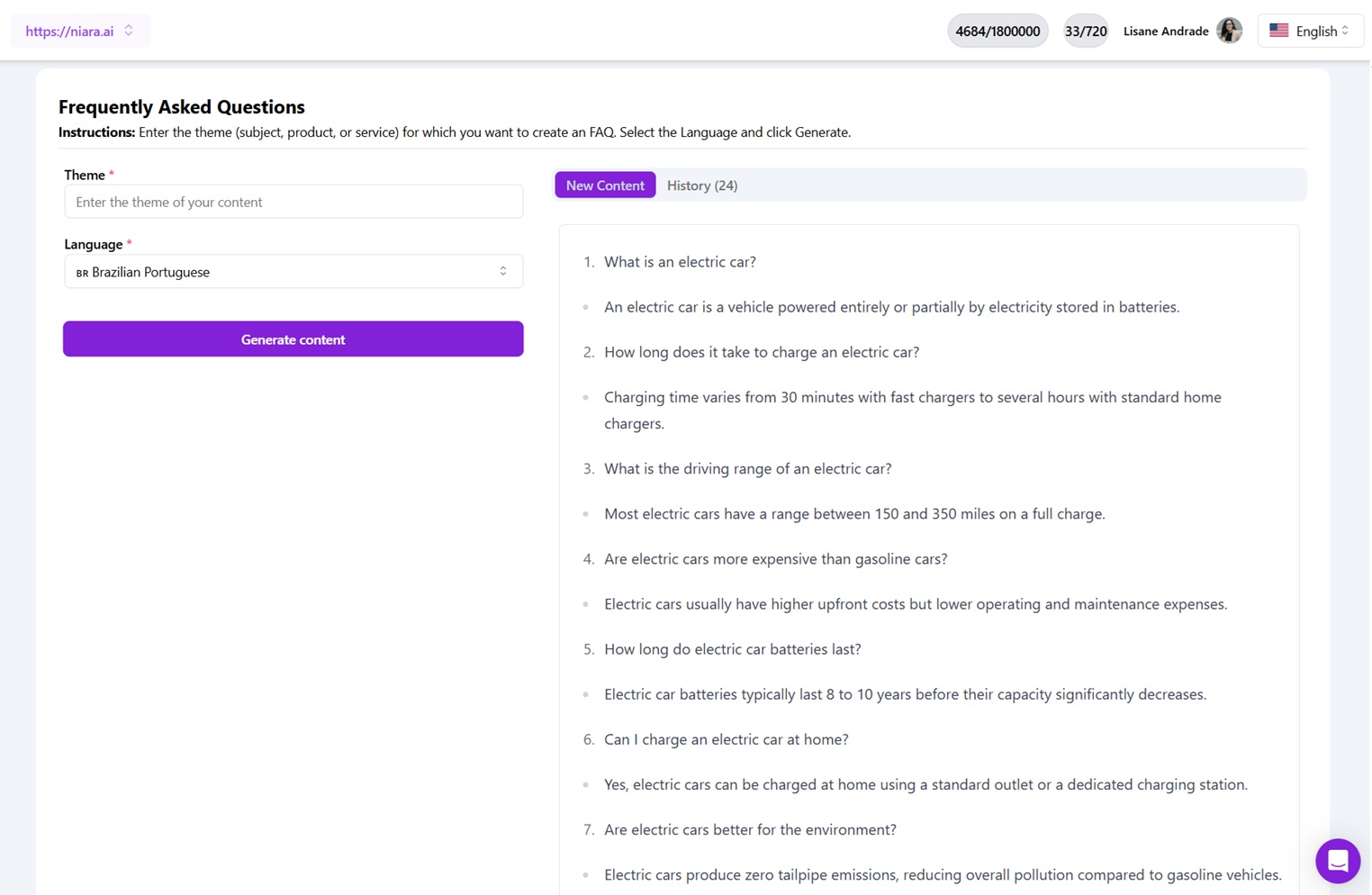
- ChatSEO: For something more personalized, I recommend using ChatSEO. It is our conversational assistant that has access to real-time data and a prompt library.

3. Give Context (The Secret Sauce)
The quality of the AI’s answer depends on the quality of your command. Don’t just ask “Create an FAQ”. Inform Niara about:
- The product/service (e.g., Running shoes for marathon runners).
- The target audience (e.g., Beginner and intermediate athletes).
- The brand’s tone of voice.
Example Prompt in ChatSEO:
“Act as a Customer Success specialist. Create a list of 10 frequently asked questions and answers for financial management software for small businesses. The tone should be encouraging and simple. Include questions about data security and bank integration.”
4. Multi-Language Support
Is your business global? Niara offers support for writing in multiple languages. Just select the desired language in the Task input or request it in the ChatSEO prompt.
Golden Tips for writing irresistible answers
AI generates the base, but your curation transforms the text into conversion. When reviewing or writing answers, follow these guidelines:
- Be Concise: No one wants to read a treaty. Get straight to the point. Answer “Yes” or “No” right at the beginning, if applicable, and then explain.
- Inverted Pyramid Structure: The most important information comes first. Secondary details come later.
- Tone of Voice: Maintain consistency. If your brand is fun, the FAQ cannot be robotic. If it’s a law firm, it needs to convey seriousness and security.
- Use Internal Links: This is a fundamental SEO strategy. If the answer mentions “Subscription Plans”, link to the pricing page. This improves navigation and time on site.
How to organize an FAQ effectively?
A messy FAQ is as useless as not having one. Visual organization is key to usability.
- Categorization: Group questions by themes. Example: Shipping, Payments, Returns & Exchanges, Product.
- Clickable Index: At the top of the page, place anchor links for each category.
- Accordion Style: You know that format where you click on the question and the answer expands? This is excellent for keeping the page clean and scannable, especially on mobile devices.
- Prioritization: Place the most critical questions at the top. Use the 80/20 rule: what are the 20% of questions that represent 80% of doubts? Those go first.
AI vs. Manual: Benefits and Cautions
Why use Niara and not do everything “by hand” or with generic free tools?
- Speed and Scale: What would take you 4 hours researching and writing, Niara does in minutes. That is ROI.
- SEO Quality: Niara was trained with an SEO focus. The answers are born optimized for readability and scannability.
⚠️ The human factor is irreplaceable (AI Limitations)
I always say: AI is your co-pilot, not the autopilot. AI tools can occasionally generate generic information or “hallucinate” data (invent facts).
Your obligation as a professional is:
- Verify the accuracy of technical information.
- Adjust the tone of voice to ensure brand personality.
- Ensure that company policies (such as return deadlines) are 100% correct.
How to measure if your FAQ is working?
Published? The work isn’t over. Monitor effectiveness:
- Time on page: If users stay for a short time, they might not be finding what they need.
- Reduction in Tickets: Did the number of support emails regarding basic topics decrease? Success!
- Feedback: Include a “Was this answer helpful?” button (thumbs up/down) at the end of each answer.
How much does it cost to create FAQs with Niara?
You can start optimizing your content today. Niara offers flexible plans for freelancers, agencies, and Enterprise companies.
- Free Trial: Test for 7 days with access to features.
- Plans: We have monthly options that adapt to your demand volume. Check out our updated pricing page here.
Simplify your SEO today
Creating an FAQ doesn’t have to be a headache. With the right strategy and Niara by your side, you transform doubts into trust and visitors into customers.
Want to scale your content production and optimize your time by up to 10x?